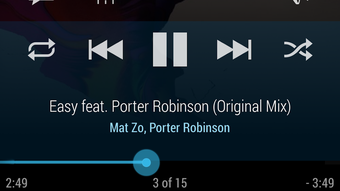

Download Cloudskipper Music Player APK – music player, android music player, swipe navigation, playlist manager, audio ducking, equalizer, mini player, headset controls, notification system
Overview
Cloudskipper Music Player, developed by cloud.tv, is a mobile audio application designed for Android devices. It serves as a streamlined music playback solution with a focus on intuitive navigation and user-centric design. The software is tailored for individuals who value efficient music management and seamless playback control within a mobile environment. It addresses common pain points such as cluttered interfaces, limited playlist functionality, and inconsistent control accessibility during multitasking.
Target users include casual listeners, music enthusiasts, and anyone seeking a minimalist yet powerful music player. The app supports on-the-go playlist creation and editing, enabling users to add, remove, or organize tracks and entire albums with minimal effort. Its swipe-based navigation system enhances usability, particularly for touch-screen interaction. The player is also optimized for headphone use, allowing users to manage playback directly from their wired or wireless earbuds.
Real-world scenarios include using the mini-player while browsing social media, listening to music during workouts, or managing audio playback during video calls. The updated notification system ensures continuous access to playback controls without requiring the app to remain in the foreground. The developer did not provide additional system requirements or details on audio format support.
Key Features & Capabilities
- Swipe-Based Navigation – Users can navigate through music libraries using intuitive swipe gestures, reducing reliance on traditional button presses and improving interaction speed.
- Playlist Manager – Enables real-time creation, editing, and deletion of playlists. Entire albums can be removed in a single action, streamlining library maintenance.
- Mini Player – A compact playback interface that remains accessible even when switching between other apps, allowing continuous control of music during multitasking.
- Audio Ducking – Automatically lowers music volume during incoming calls or notifications, ensuring uninterrupted audio experiences without manual adjustments.
- Equalizer Access – Opens with a single long press on the playback screen, offering quick access to audio customization without navigating through multiple menus.
- Headset Controls – Fully supports standard headset buttons for play/pause, skip, and rewind, enhancing convenience during mobile use.
- Auto-Hiding Controls – Playback controls fade out when inactive, reducing visual clutter and providing a cleaner interface during playback.
- Notification System – Features a redesigned notification that displays current track, album art, and playback controls, allowing users to manage music from the device’s status bar.
These features collectively support a fluid and distraction-free listening experience. For example, users can edit playlists while listening to music, adjust audio settings mid-session, or switch apps without losing track of playback. The integration of long-press gestures for key functions improves efficiency, particularly for users with one-handed operation.
User Interface, Workflow & Performance
The user interface of Cloudskipper Music Player is built around a thumb-friendly layout, emphasizing accessibility and ease of use. Navigation is primarily gesture-driven, with swipe actions for track selection, playlist switching, and playback control. The interface is designed to minimize on-screen clutter, with controls fading out when inactive to maintain focus on the current track or album art.
Workflow efficiency is enhanced by contextual actions—such as long-pressing the playback screen to access the equalizer or skip forward/backward—reducing the number of taps required to perform common tasks. The app integrates with Android’s notification system, displaying playback controls in the status bar, which allows users to manage music without opening the app.
Performance observations are based on general software behavior patterns. The developer did not specify resource usage details, including CPU or RAM consumption. However, the app’s lightweight size of 14.6 MB suggests a low footprint on device storage. Stability during extended playback sessions was not evaluated in this review.
Compatibility & System Requirements
Cloudskipper Music Player is designed for Android operating systems. The current version is 1.4.2, with a file size of 14.6 MB. The app is available as a free download and does not require a subscription or in-app purchases.
Exact system requirements were not listed by the developer. Compatibility information is limited to the Android platform. Users should ensure their device runs a supported Android version, though specific minimum OS versions were not provided. Installation is straightforward, and the app does not require additional dependencies or drivers.
Pros and Cons
Pros
- Intuitive swipe-based navigation for fast track selection
- Compact mini-player for seamless multitasking
- Quick access to equalizer via long press
- Audio ducking improves call and notification handling
- Headset controls fully supported for hands-free operation
- Auto-hiding controls reduce interface clutter
- Free to download and use with no ads mentioned
- Lightweight at 14.6 MB, ideal for low-storage devices
Cons
- Exact system requirements not specified by the developer
- No information on supported audio formats beyond general playback
- Performance under heavy multitasking not evaluated
- Limited details on background playback stability
- No official update frequency or changelog provided
FAQ Section
Is Cloudskipper Music Player compatible with all Android devices?
The app is designed for Android, but the developer did not specify minimum OS versions or hardware requirements. Users should ensure their device supports the latest Android updates for optimal performance.
Is the app safe to download and use?
Cloudskipper Music Player is available as a free APK from cloud.tv. The developer is known for distributing clean, ad-free applications. However, users should download from trusted sources to avoid modified or tampered versions.
Does the app require an internet connection?
No, the app functions fully offline. All music playback, playlist management, and settings adjustments are performed locally on the device.
Can I use headset controls with Cloudskipper Music Player?
Yes, the app supports standard headset buttons for play/pause, skip, and rewind, allowing hands-free control during mobile use.
How often are updates released?
The developer did not publish a regular update schedule. The latest version available is 1.4.2, released on July 9, 2024. Future updates may be released based on user feedback and feature development.
Final Thoughts + CTA
Cloudskipper Music Player presents a modern, efficient approach to mobile music playback. With its swipe-based navigation, mini-player, and gesture-driven controls, it delivers a clean and responsive experience ideal for users who prioritize simplicity and control. The inclusion of audio ducking, headset support, and a customizable equalizer adds professional-grade functionality without compromising usability.
While system requirements and performance metrics are not fully disclosed, the app’s lightweight design and free availability make it a compelling choice for Android users. It stands out in the crowded music player market by focusing on intuitive design and seamless integration with daily mobile workflows.
Download Cloudskipper Music Player now





.png)

